The difference in one minute
Keeps it
Bookmark
- Saved until you delete it.
- It comes back only when you go and open it.
- Best for things you want to keep for good.
Brings it back
Snooze
- Closes now and opens again by itself, on the day and at the time you pick.
- It can repeat: every Friday, every month.
- Optional note over the page when it returns.
- Best for things for a specific moment later.
Keeps it in sight
Leave it open
- Always there, easy to find.
- It takes room in your tab bar.
- Best for what you are using right now.
Which one should I use?
You want to…Use
Keep a page for good, like a recipe or a referenceA bookmark
Read an article tonight, not nowSnooze: “tonight”
Deal with a form on Friday morningSnooze: “friday 9”
Check something every MondaySnooze that repeats: “every monday 9”
Work on it in the next few minutesLeave it open
You can use both
Snoozing doesn’t replace bookmarks, and zzzTab isn’t a bookmark manager. Use bookmarks for what you want to keep and snoozing for what you want to deal with at a given moment.
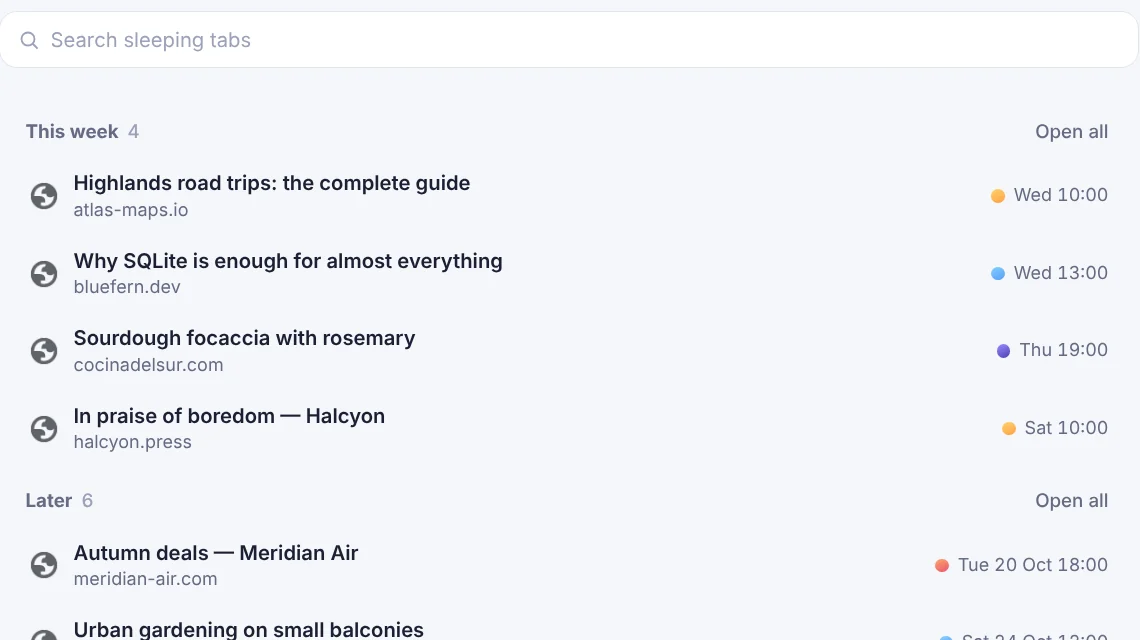
A snoozed tab isn’t deleted: zzzTab keeps its address and title in your list, in “Sleeping”, and opens it again at the time. It does not keep what you were typing in the page.
Try it with one tab
- Open a page you don’t need right now.
- Click the zzzTab icon and type “tomorrow 9”.
- Press Snooze. Tomorrow at 9 it opens by itself.
Questions
Is a snoozed tab deleted?
No. zzzTab keeps its address in your list and opens it again at the time you chose.
Can I see everything I snoozed?
Yes. Click “Sleeping” in the popup to see everything that is asleep, in order of when it comes back. You can search, open a tab now, change its time or remove it.
Can I undo a snooze?
Yes, for 5 seconds after snoozing the tab is still open and you can undo it.
Try it in a minute
Free Chrome extension. No account, and everything stays in your browser.